Member groups
ClubPal allows you to create and assign your own groups to members. You can view the groups a member belongs to on their member page in the Admin area, and assign groups by editing their profile.
Uses
Sending emails
The main benefit of groups is that you can send an email to one or more groups at once. For example, you could add a group called Coach or Run Coach, and then use the Quick Compose or full email editor to target all members in that group. Groups appear as a Smart Group option in the email To field.
You can also find a Group filter on the Members list page at Admin > Membership > Members, allowing you to export all members in a group or launch the Quick Compose email tool for that group.
Restricting session bookings
Groups can be used to control who can book on to a session. When creating or editing a session, use the Required Groups setting to specify which groups are allowed to book. Only members belonging to at least one of the selected groups will be able to book.
This is useful for sessions intended for specific audiences, such as Junior sessions, Adults-only sessions, or sessions requiring a specific group membership. If no groups are selected on a session, no group restriction is applied.
See Creating sessions for more details.
Managing groups
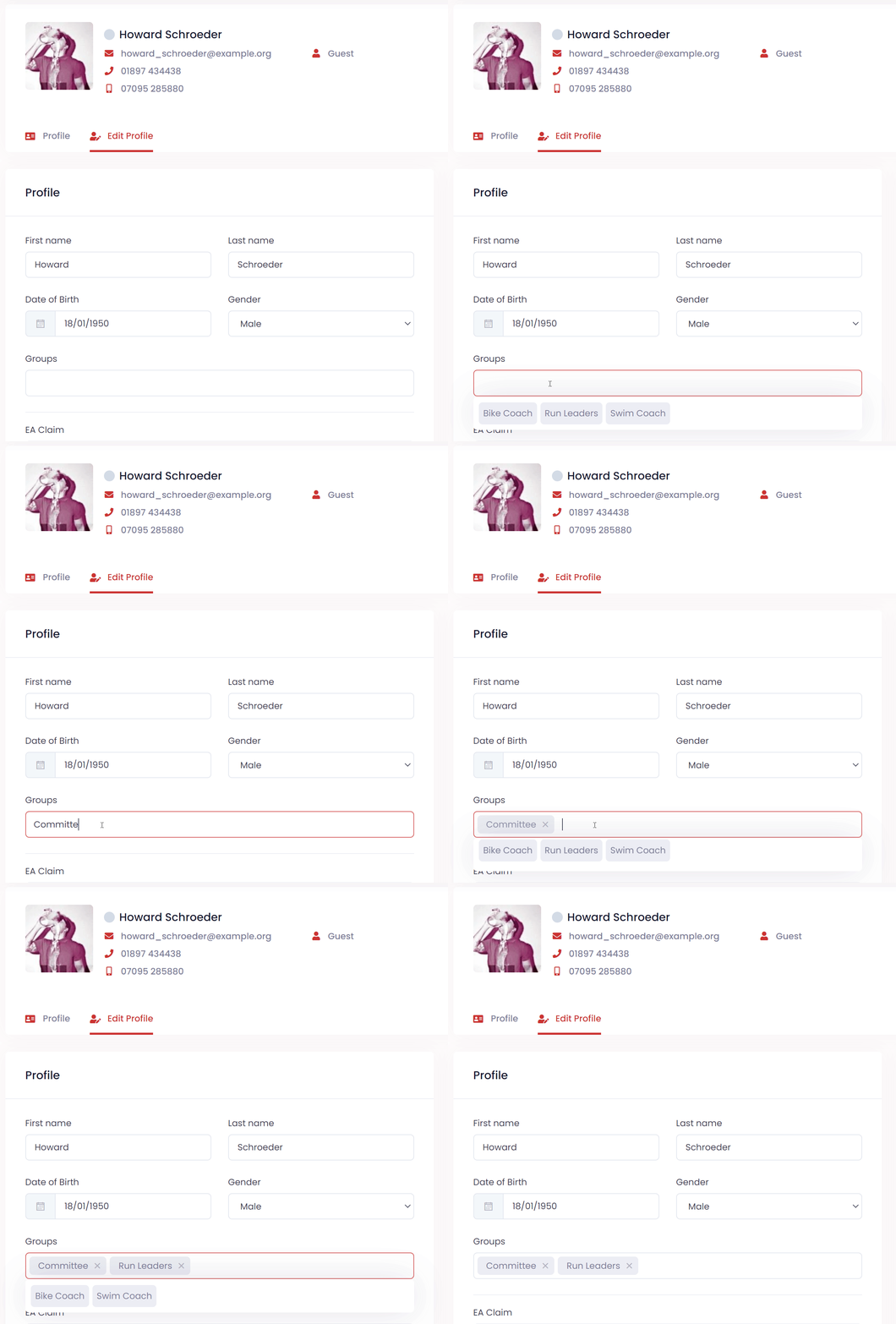
To assign a group to a member, navigate to their profile and go to the Edit Profile page.
On this page you will see an option to select or add a group. When you select the field, a list of previously used groups will appear, or you can type a new one.
See also
- Member qualifications — record certifications and coaching badges for members